在Docker中安装OpenClaw
docker run -it --rm \ -e NPM_CONFIG_REGISTRY=https://registry.npmmirror.com \ -u root \ -v /home/moatkon/codes/memos-self-hosted/openclaw:/root/.openclaw \ -v /home/moatkon/codes/memos-self-hosted/openclaw/workspace:/root/.openclaw/workspace \ alpine/openclaw onboard docker run -d \ --name openclaw \ --restart unless-stopped \ -e NPM_CONFIG_REGISTRY=https://registry.npmmirror.com \ -u root \ -v /home/moatkon/codes/memos-self-hosted/openclaw:/root/.openclaw \ -v /home/moatkon/codes/memos-self-hosted/openclaw/workspace:/root/.openclaw/workspace \ -p 18789:18789 \ alpine/openclaw \ node openclaw.mjs gateway --allow-unconfigured --bind lan建议使用root,否则有一些系统工具调用不到。之前使用的是moatkon用户,发现调用不了crontab,后面换了root才行。换了root需要重新配置,不能简单的把moatkon的配置文件挂载上来。
配置文件修改最佳实践,使用filebrowser
version: "3.8"services:  filebrowser:    image: filebrowser/filebrowser:latest    container_name: filebrowser-openclaw    user: 0:0    volumes:      - /home/moatkon/codes/memos-self-hosted/openclaw:/srv    command:      - --database      - /database/filebrowser.db      - --root      - /srv    ports:      - 2081:80    restart: unless-stopped
networks: {}
安装好之后,就可以在filebrowser方便的修改openclaw配置文件了
为了可以方便的访问web页面,进行如下设置:
# 1. 开启其他机器访问,否则只能在容器内访问,外面访问不到gateway.bind改为lan
# 2. 允许非https访问"gateway": {    "controlUi": {        "allowInsecureAuth": true    },}
改完后,重启
按照官方文档来, https://docs.openclaw.ai/zh-CN/channels/feishu
我遇到一个问题,就是飞书插件重复。建议优先使用openclaw官方的,不要再自行安装
飞书插件警告:
duplicate plugin id detectedlater plugin may be overridden (/app/extensions/feishu/index.ts)系统里已经存在一个 feishu 插件,现在又加载了一个同名插件,两个插件 id 都叫 feishu,OpenClaw 会只保留其中一个,后加载的可能覆盖前一个。 这会导致:pairing 记录写入的是 A 插件,运行时加载的是 B 插件,approve 时查不到 pending,这正是出现 “No pending pairing request” 的合理解释。
解决方法:
第一步:看插件目录执行:ls -R /app/extensionsls -R /home/node/.openclaw/extensions
你大概率会看到:/app/extensions/feishu/home/node/.openclaw/extensions/feishu说明有两个来源:内置插件(/app/extensions)手动安装插件(~/.openclaw/extensions)

删完重复其中的一个插件,再次执行。
在飞书中,随意发一条消息触发配对,有配对码之后执行下面的命令
/app/dist/index.js pairing list feishu
/app/dist/index.js pairing approve feishu <code>
使用飞书消息无法创建自动任务
Section titled “使用飞书消息无法创建自动任务”根本原因: crontab无法使用问题。
这也是为啥使用root用户来操作的原因,root用户什么系统工具都可以操作。并且在docker中,相对安全
为什么普通聊天可以,但 Cron 不行?OpenClaw 把操作分成两类:
- 普通对话(agent 调用)
- 受保护命令(cron / devices / config 等)
受保护命令需要:设备已 pairing 或在 approvals allowlist 鼓励列表里,你当前飞书账号可能只是完成了 pairing,但没有被加入 allowlist。
在容器里执行:
/app/dist/index.js approvals allowlist add feishudist/index.js approvals allowlist add local这样就可以创建cron jobs了
openclaw.json
Section titled “openclaw.json”我配置的是kimi模型,可以由你自行选择.
{ "wizard": { "lastRunAt": "2026-02-16T17:37:58.993Z", "lastRunVersion": "2026.2.15", "lastRunCommand": "onboard", "lastRunMode": "local" }, "auth": { "profiles": { "moonshot:default": { "provider": "moonshot", "mode": "api_key" } } }, "models": { "mode": "merge", "providers": { "moonshot": { "baseUrl": "https://api.moonshot.cn/v1", "api": "openai-completions", "models": [ { "id": "kimi-k2.5", "name": "Kimi K2.5", "reasoning": false, "input": [ "text" ], "cost": { "input": 0, "output": 0, "cacheRead": 0, "cacheWrite": 0 }, "contextWindow": 256000, "maxTokens": 8192 } ] } } }, "agents": { "defaults": { "model": { "primary": "moonshot/kimi-k2.5" }, "models": { "moonshot/kimi-k2.5": { "alias": "Kimi" } }, "workspace": "/root/.openclaw/workspace" } }, "commands": { "native": "auto", "nativeSkills": "auto" }, "channels": { "feishu": { "appId": "飞书应用Id", "appSecret": "飞书密匙", "domain": "feishu", "enabled": true, "groupPolicy": "open" } }, "gateway": { "port": 18789, "mode": "local", "bind": "loopback", "auth": { "mode": "token", "token": "你的token" }, "tailscale": { "mode": "off", "resetOnExit": false }, "controlUi": { "allowInsecureAuth": true }, "nodes": { "denyCommands": [ "camera.snap", "camera.clip", "screen.record", "calendar.add", "contacts.add", "reminders.add" ] } }, "plugins": { "load": { "paths": [ "/app/extensions/feishu" ] }, "entries": { "feishu": { "enabled": true } } }, "meta": { "lastTouchedVersion": "2026.2.15", "lastTouchedAt": "2026-02-16T17:37:59.012Z" }}如何集成语音?
Section titled “如何集成语音?”直接让OpenClaw自己集成。
我这边第一次失败了 失败后,OpenClaw自己写了一个脚本,让我执行。我执行后发现是磁盘空间不足导致的。所以如果磁盘空间够,第一次就会成功。失败的原因我让ChatGPT看了一下,是因为默认下载的是Whisper GPU版本。这个文件太大了。而且我的机器没有GPU.所以切换了CPU版本,手动安装成功之后,告诉OpenClaw安装好了,她自己会检测。后面就可以愉快的使用语音了。
pip install torch --index-url https://download.pytorch.org/whl/cpu
pip install openai-whisper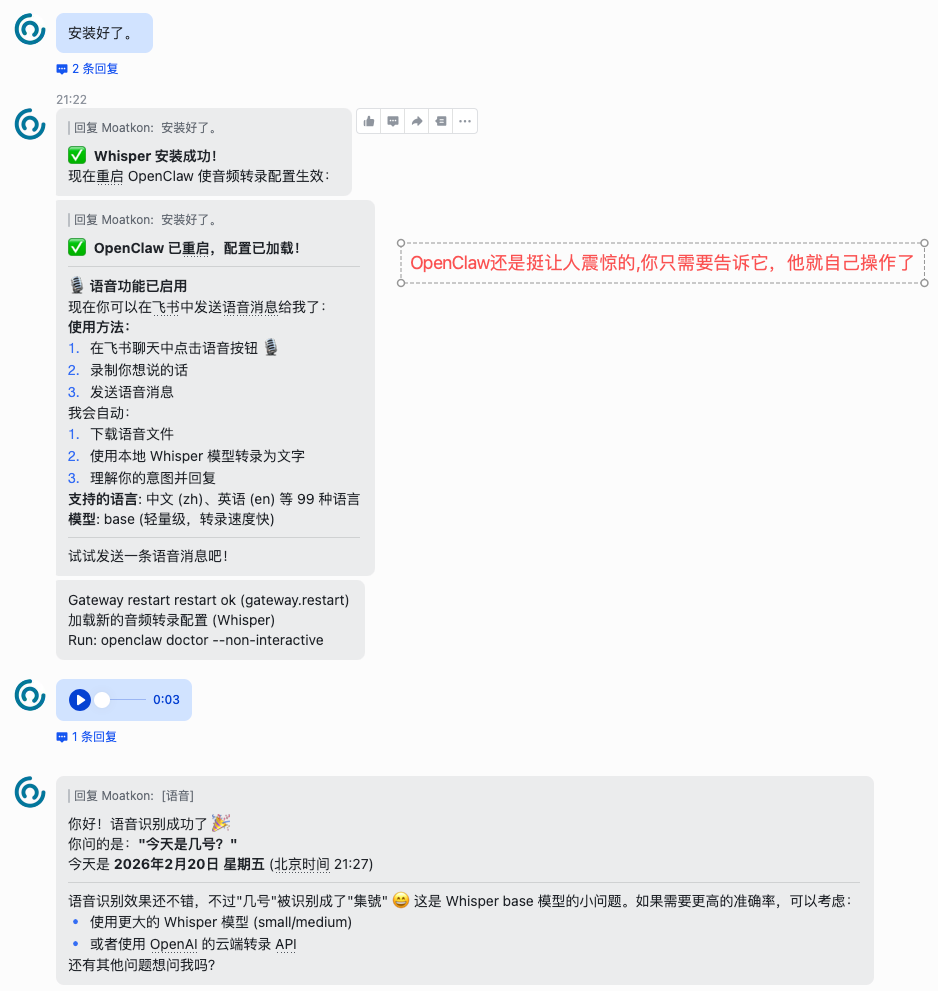
基于Starlight构建 | 主题色: Flexoki | 构建日期: 2026.03.28 | Change Log | Ko-fi